
Download Testportal – Online Testing, AI Quiz Maker, Secure Assessment Tool
Intro
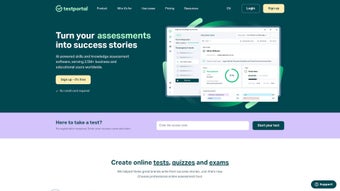
Testportal is a cloud‑native, web‑based assessment platform that completely redefines how educators, corporate trainers, and hiring teams create, deliver, and analyze quizzes, exams, and certification tests. By merging an intuitive drag‑and‑drop builder with a powerful AI‑driven question generator, the service reduces the time required to author a full assessment from several hours to just a few minutes. The platform is built for scalability, security, and flexibility: it offers real‑time analytics, detailed reporting, and a comprehensive proctoring suite that includes browser lockdown, webcam monitoring, and AI‑based cheat detection.
Because Testportal runs entirely in the browser, there is no need for manual installations or frequent patching—updates are applied automatically on the server side, ensuring every user always works with the latest, most secure version. Whether you are designing a semester‑long university exam, a corporate onboarding quiz, or a fast‑track recruitment test, Testportal adapts to any scenario while maintaining a clean, responsive UI that works across desktop and mobile browsers. Its extensive integration capabilities—RESTful APIs, LTI, SSO, and Zapier—allow seamless embedding into existing Learning Management Systems (LMS), Human Resources Information Systems (HRIS), or intranet portals, creating a unified experience for both administrators and test‑takers.
This introductory overview sets the stage for a deeper dive into the platform’s standout features, practical usage instructions, and an honest assessment of its strengths and limitations.
Key Features & How to Use Testportal
Testportal’s feature set is designed to address every stage of the assessment lifecycle—from rapid content creation to secure delivery and insightful analysis. Below you will find a detailed list of core capabilities, followed by step‑by‑step guidance on getting started, configuring your environment, and publishing your first test. This combined approach ensures you not only understand what the tool can do but also how to unlock its full potential in real‑world scenarios.
- AI‑Driven Question Generator: Instantly produce multiple‑choice, true/false, matching, and open‑ended items based on simple keyword inputs, dramatically cutting authoring time.
- Extensive Customization: Brand the test interface with logos, colors, and custom instructions; set time limits, randomize question order, and apply adaptive scoring rules.
- Rich Question Types: Supports multimedia (images, audio, video), drag‑and‑drop sorting, code snippets, and LaTeX‑based mathematical formulas.
- Secure Proctoring Suite: Browser lockdown, AI‑powered eye‑tracking, live webcam streaming, and automated plagiarism detection safeguard exam integrity.
- Real‑Time Analytics & Reporting: Dashboards display pass/fail rates, item difficulty, average response time, and competency heat‑maps; reports can be exported as CSV or PDF for compliance.
- Seamless Integrations: LTI 1.3, SCORM, SSO (SAML/OAuth), Zapier, and a robust REST API enable connection to LMS, HR platforms, and CRM systems.
- Responsive Design: Fully functional on Windows, macOS, Linux, Android, and iOS browsers; mobile‑first layout ensures smooth experiences on tablets and smartphones.
- Automated Feedback & Grading: Instant scoring for objective items, custom rubrics for essays, and auto‑generated feedback comments improve learner engagement.
- Version Control & Collaboration: Multiple authors can co‑edit assessments with change tracking, comment threads, and role‑based permissions.
- Scalable Cloud Hosting: Built on AWS, the platform automatically scales to support thousands of concurrent test‑takers without performance degradation.
Getting Started: Installation, Setup, and First Test Creation
Because Testportal is a SaaS solution, there is no traditional installation on the user’s device. The onboarding process consists of three main phases: account creation, environment configuration, and assessment authoring. Begin by visiting the official website and clicking the “Start Free Trial” button. Provide a valid email address, set a secure password, and confirm your account via the verification link. The 14‑day trial grants full access to all features, after which you can select a monthly or annual subscription that best fits your organization’s size.
Once logged in, navigate to the “Settings” tab to configure single sign‑on (SSO) using SAML or OAuth, upload your organization’s logo, and define data‑retention policies for GDPR or FERPA compliance. The “Proctoring” section lets you enable webcam monitoring, set allowed browsers, and adjust AI‑based cheat‑detection thresholds. For institutions requiring strict security, you can also enforce TLS‑only connections and enable two‑factor authentication for administrators.
To build your first assessment, click “Create New Test” and choose a template that matches your use case—Quiz, Certification Exam, Recruitment Test, etc. The drag‑and‑drop builder allows you to add sections, select question types, and input content. If you enable the AI question generator, simply type a topic phrase such as “basic algebra” or “cybersecurity best practices,” and the engine will propose a set of questions that you can review, edit, or accept as‑is.
You can also import questions from CSV, QTI, or Moodle XML formats, making migration from legacy systems painless. When the assessment is ready, set availability dates, assign it to user groups, and choose a delivery mode (open link, LMS embed, or email invitation). The real‑time monitoring dashboard shows live participation statistics, flagged cheating incidents, and network health.
After the test window closes, the automated grading engine processes objective items instantly, while manual reviewers assess essay responses using the built‑in rubric tool. Finally, generate a comprehensive report, share it with stakeholders, or export it for archival purposes.
Compatibility: Because Testportal runs entirely in the browser, it works on any modern operating system—Windows 10/11, macOS Ventura and later, Linux distributions with up‑to‑date browsers, as well as Android 9+ and iOS 13+ devices. The platform supports Chrome, Edge, Firefox, Safari, and Opera, ensuring a consistent experience across all major browsers.
Pros and Cons
Pros
- AI‑generated questions drastically reduce authoring time.
- Comprehensive proctoring suite maintains test security.
- Deep integration options (LTI, SSO, API) fit into existing tech stacks.
- Responsive design works flawlessly on desktop and mobile.
- Real‑time analytics provide actionable insights for educators and trainers.
- Scalable cloud infrastructure handles large candidate volumes without lag.
- Version control and collaborative authoring streamline team workflows.
- Regular updates and 24/7 support included in subscription.
Cons
- Subscription pricing may be a barrier for small schools with limited budgets.
- Advanced proctoring features require stable internet and webcam access, which can be problematic in low‑bandwidth regions.
- Learning curve for administrators unfamiliar with AI‑driven question customization.
- No offline mode; internet connectivity is mandatory for test delivery.
- Export formats are limited to CSV and PDF; more specialized formats (e.g., xAPI) require custom API development.
Frequently Asked Questions
Below are some of the most common questions new users have about Testportal. Each answer is crafted to help you make an informed decision and get the most out of the platform.
Can I use Testportal for free?
Testportal offers a 14‑day free trial that provides full access to all features, including AI question generation and proctoring. After the trial, you’ll need to choose a paid subscription to continue using the platform.Is student data stored securely?
Yes. All data is encrypted at rest and in transit using AES‑256 and TLS 1.3. Testportal complies with GDPR, FERPA, and ISO‑27001 standards, and you can configure data‑retention policies to meet regional regulations.Can I integrate Testportal with my existing LMS?
Absolutely. Testportal supports LTI 1.3, SCORM, and provides a robust REST API, allowing seamless embedding into Moodle, Canvas, Blackboard, or any custom learning platform.How does the AI question generator work?
The AI engine analyses the keyword or topic you provide, references an internal knowledge base, and creates multiple‑choice, true/false, or short‑answer items. You can review, edit, or reject each generated question before publishing.What proctoring options are available?
Testportal includes browser lockdown, webcam monitoring with AI‑based eye‑movement analysis, live screen sharing, and automated plagiarism detection. Each option can be toggled per assessment to match security requirements.Conclusion – Why You Should Download Testportal Today
In a world where remote learning, virtual recruitment, and hybrid work environments have become the norm, Testportal stands out as a complete, secure, and intelligent assessment solution that eliminates the tedious parts of test creation while strengthening exam integrity. Its AI‑powered question generator slashes authoring time, while the extensive customization options let you brand every assessment to match your organization’s identity. Real‑time analytics and detailed reporting provide actionable insights that help educators close knowledge gaps and enable corporate trainers to measure skill acquisition with precision.
The cloud‑native architecture guarantees that you always have the latest features and security patches without the need for manual updates, and the platform’s seamless integration capabilities mean you can embed assessments directly into the tools you already use, such as LMS, HRIS, or intranet portals. Whether you’re a university department modernizing exams, a corporate trainer scaling certification programs, or a hiring manager seeking a fair, data‑driven recruitment test, Testportal offers the flexibility, reliability, and security you need. Take advantage of the 14‑day free trial, experience the speed of AI‑assisted authoring, and watch how real‑time insights transform your evaluation process.
Download Testportal now, start delivering smarter, safer, and more engaging assessments, and stay ahead in the rapidly evolving landscape of digital learning and hiring.
Testportal impresses with its AI‑driven question creation and robust proctoring suite, making it a top choice for both education and corporate assessment needs. While the subscription cost may be a consideration for smaller institutions, the productivity gains and security benefits more than justify the investment.



.png)



